Showing posts with label Blogger Widgets. Show all posts

Twitter Follower Box | Twitter Fan Box

Filled under: ,

Twitter Follower Box is a nice blogger widget. Many blogger have been waiting for this great widget, that allows your visitors to follow you via twitter account without leaving your site. It's called Twitter Follower Box or Twitter Fan Box. It works like and is closely based on the Facebook fan/Like box blogger widget. The code for this Fan box is created by Muhammad Zeeshan

1. Go To Blogger > Design
2. Select HTML/JavaScript widget
3. Paste the code below inside it

<!-- Twitter Follower Box -->
<script type='text/javascript'>
function fanbox_init(screen_name){document.getElementById('twitterfanbox').innerHTML='\<iframe name=\"fbfanIFrame_0\" frameborder=\"0\" allowtransparency=\"true\" src=\"http://s.moopz.com/connect.html?user='+screen_name+'\" class=\"FB_SERVER_IFRAME\" scrolling=\"no\" style=\"width: 250px; height: 250px; border-top-style: none; border-right-style: none; border-bottom-style: none; border-left-style: none; border-width: initial; border-color: initial; \"\>\<\/iframe\>';}
</script>
<div id="twitterfanbox"></div><script
type="text/javascript">fanbox_init("MyPakBlogger");</script
type="text>
<!-- End Twitter Follower Box -->


4. Replace MyPakBlogger with your twitter username
5. Save and you are done!

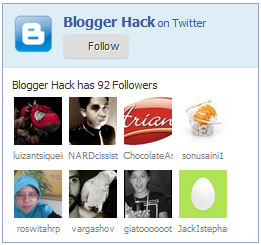
The widget will looks like image bellow.
Twitter Follower Box | Twitter Fan Box

Posted By Zee09:57

Subscription Gadgets With Unique Icons

Filled under: ,

In this week doing a few jobs on blogs i added some cool subscription icons to the sidebars for html websites like blogger. The icons link to the Rss Feed, Facebook and Twitter profiles for the blogger blog. Popup new Blogger Follow By Email Form gadget below the icons and you have all the main subscription options offered to user. Anyway the icons look very nice and great one set is in the design of Polaroid photographs, the second set is also Polaroid Photograph Design but with a worn vintage feel and the third are nice bright and colorful with a slight 3d look. I thought some user of Spice Up Your Blog might like them so i have the code here and instructions that how to add them to your blogger blog. The demo of these icons are connected to our profiles of Rss, Facebook and Twitter so you can check them out and subscribe, Like and Follow if you don't already.

Three Sets Of Cool Subscription Icons
The Polaroid Icons :


The Polaroid Icons Code :
(Replace The URLs In Red With Your Rss, Facebook And Twitter)
<a href="http://feeds.feedburner.com/spiceupyourblog" imageanchor="1" style="margin-left: 1em; margin-right: 1em;"><img border="0" src="https://blogger.googleusercontent.com/img/b/R29vZ2xl/AVvXsEgm5By2XOceSmkMGI0aw-WxNeZ04ly4B4VzjhVJuN7TWji9AbmfMncd5Ob3xQOQB48LQlH4d3UV-4mngS-P0Rf3JOyGyMhroY4jyQbqabSKkyRqFm5xdj3EcFzvH3ptJz4CEqbPdKXoBF4p/s1600/rss.png" /></a><a href="http://facebook.com/spiceupyourblog" imageanchor="1" style="margin-left: 1em; margin-right: 1em;"><img border="0" src="https://blogger.googleusercontent.com/img/b/R29vZ2xl/AVvXsEh9YRnapnZ144pfP4HwiDJCi7Ni6uk-Ys7kjYV-zEfUC4_7b9Szjkl9sX0c7vAs-uH6YkDpjSx_9Nx0Qiav2GNvhtZ0LSeByHkiouMKnF-DztK-k4eEzUMf7weQYGGwxETuHcR0slaWj68A/s1600/facebook.png" /></a><a href="http://twitter.com/paulcrowepro" imageanchor="1" style="margin-left: 1em; margin-right: 1em;"><img border="0" src="https://blogger.googleusercontent.com/img/b/R29vZ2xl/AVvXsEhPCORVO2yKkNbZMENjvDZad0NRJzdnBtxMq-7VB1dLThyKJef5nKlvxgkLls2wiodn3zHgiD3trp4LPYehRKE1dLYk0PhCnux_CSShRnp_m3TUbwLU9SP6hRPYXrwwXU6boHWyhUe7d4nO/s320/twitter.png" /></a><br/><a href="http://www.spiceupyourblog.com" target="_blank"><small>Blog Gadgets</small></a>
The Vintage Polaroid Icons


The Vintage Polaroid Icons Code :(Replace The URLs In Red With Your Rss, Facebook And Twitter)
 <div id="fb-root"> </div> <script>(function(d, s, id) { var js, fjs = d.getElementsByTagName(s)[0]; if (d.getElementById(id)) return; js = d.createElement(s); js.id = id; js.src = "//connect.facebook.net/en_US/all.js#xfbml=1"; fjs.parentNode.insertBefore(js, fjs); }(document, 'script', 'facebook-jssdk'));</script> <br /> <div class="tbicustomlb"> <div class="fb-like-box" data-border-color="#F4F4F4" data-header="false" data-height="275" data-href="https://www.facebook.com/pages/Sainiblogger/260641427388999" data-show-faces="true" data-stream="false" data-width="245"> </div> </div> <style> .tbicustomlb { margin: 10px auto; background-color: #F4F4F4; width: 251px; padding: 10px 0 10px 10px; height: 240px; overflow: hidden; -webkit-transition: all 0.5s ease-in-out; -webkit-box-shadow: 3px 4px 5px rgba(50, 50, 50, 0.75); -moz-transition: all 0.5s ease-in-out; -ms-transition: all 0.5s ease-in-out; -o-transition: all 0.5s ease-in-out; transition: all 0.5s ease-in-out; border: 10px solid rgb(189, 174, 8); } .tbicustomlb:hover { border: 10px solid #008000; -webkit-transition: all 0.5s ease-in-out; -moz-transition: all 0.5s ease-in-out; -ms-transition: all 0.5s ease-in-out; -o-transition: all 0.5s ease-in-out; transition: all 0.5s ease-in-out; } </style>

The Bright Icons :

The Bright Icons Code :
(Replace The URLs In Red With Your Rss, Facebook And Twitter)
 <div id="fb-root"> </div> <script>(function(d, s, id) { var js, fjs = d.getElementsByTagName(s)[0]; if (d.getElementById(id)) return; js = d.createElement(s); js.id = id; js.src = "//connect.facebook.net/en_US/all.js#xfbml=1"; fjs.parentNode.insertBefore(js, fjs); }(document, 'script', 'facebook-jssdk'));</script> <br /> <div class="tbicustomlb"> <div class="fb-like-box" data-border-color="#F4F4F4" data-header="false" data-height="275" data-href="https://www.facebook.com/pages/Sainiblogger/260641427388999" data-show-faces="true" data-stream="false" data-width="245"> </div> </div> <style> .tbicustomlb { margin: 10px auto; background-color: #F4F4F4; width: 251px; padding: 10px 0 10px 10px; height: 240px; overflow: hidden; -webkit-transition: all 0.5s ease-in-out; -webkit-box-shadow: 3px 4px 5px rgba(50, 50, 50, 0.75); -moz-transition: all 0.5s ease-in-out; -ms-transition: all 0.5s ease-in-out; -o-transition: all 0.5s ease-in-out; transition: all 0.5s ease-in-out; border: 10px solid rgb(189, 174, 8); } .tbicustomlb:hover { border: 10px solid #008000; -webkit-transition: all 0.5s ease-in-out; -moz-transition: all 0.5s ease-in-out; -ms-transition: all 0.5s ease-in-out; -o-transition: all 0.5s ease-in-out; transition: all 0.5s ease-in-out; } </style>

My Last Post About Facebook Widget

Posted By Zee11:42

Customize facebook like button

Filled under:


90% every blog or website has some kind social blogger widget like facebook like us or twitter etc. Such as buttons great for getting your readers involved in your social networks and it will be increase your social reputation and brand name and traffic.
MyPakBlogger blog teach you how to customize your facebook like widget by using CSS effect in your blogger widget .It will helps to increase your facebook widget's look better and encourage to focus on it.

  • Goto on blogger dashboard
  • click on Layout tab
  • click on Add a Gadget
  • copy below code on HTML/JAVASCRIPT editor
<div id="fb-root"> </div> <script>(function(d, s, id) { var js, fjs = d.getElementsByTagName(s)[0]; if (d.getElementById(id)) return; js = d.createElement(s); js.id = id; js.src = "//connect.facebook.net/en_US/all.js#xfbml=1"; fjs.parentNode.insertBefore(js, fjs); }(document, 'script', 'facebook-jssdk'));</script> <br /> <div class="tbicustomlb"> <div class="fb-like-box" data-border-color="#F4F4F4" data-header="false" data-height="275" data-href="https://www.facebook.com/pages/Sainiblogger/260641427388999" data-show-faces="true" data-stream="false" data-width="245"> </div> </div> <style> .tbicustomlb { margin: 10px auto; background-color: #F4F4F4; width: 251px; padding: 10px 0 10px 10px; height: 240px; overflow: hidden; -webkit-transition: all 0.5s ease-in-out; -webkit-box-shadow: 3px 4px 5px rgba(50, 50, 50, 0.75); -moz-transition: all 0.5s ease-in-out; -ms-transition: all 0.5s ease-in-out; -o-transition: all 0.5s ease-in-out; transition: all 0.5s ease-in-out; border: 10px solid rgb(189, 174, 8); } .tbicustomlb:hover { border: 10px solid #008000; -webkit-transition: all 0.5s ease-in-out; -moz-transition: all 0.5s ease-in-out; -ms-transition: all 0.5s ease-in-out; -o-transition: all 0.5s ease-in-out; transition: all 0.5s ease-in-out; } </style>

  You should Replace Red highlighted line on above code to your facebook page name .

Posted By Zee11:48

Social Widget with Hover Effect

Filled under:


  • Goto on blogger dashboard
  • Click on Layout tab
  • Click on Add a Gadget
  • Copy below code on HTML/JAVASCRIPT editor
<style type="text/css"> #buttonbg {width: 260px;margin: 10px 20px;padding: 0;} #buttonbg li {cursor: pointer;height: 48px;position: relative;list-style-type: none; } #buttonbg .icon {background: #D91E76 url('https://blogger.googleusercontent.com/img/b/R29vZ2xl/AVvXsEgZadSelSZfky_NDXfOD_15toZ7deZftrtpz0009QYjPNHVY1evQOwxsHwJa05W9B7Jv3KTs8MLKHwfrGhxdtuPiqJm_DuhQCjPWbJDLlKlhTZ3r7_i6oLK2im0UgX1v-suNtH-lugGHYk/s1600/blsocial12.png') 0 0 no-repeat; background-color: rgba(217, 30, 118, .42);border-radius: 30px;display: block; color: #141414;float:none;height: 48px;line-height: 48px; margin: 5px 0;position: relative;text-align: left;text-indent: 90px; text-shadow: #333 0 1px 0;white-space: nowrap;width: 48px;z-index: 5; -webkit-transition: width .25s ease-in-out, background-color .25s ease-in-out; -moz-transition: width .25s ease-in-out, background-color .25s ease-in-out; -o-transition: width .25s ease-in-out, background-color .25s ease-in-out; transition: width .25s ease-in-out, background-color .25s ease-in-out; -webkit-box-shadow: rgba(0, 0, 0, .28) 0 2px 3px; -moz-box-shadow: rgba(0,0,0, .28) 0 2px 3px; -o-box-shadow: rgba(0,0,0, .28) 0 2px 3px; box-shadow: rgba(0, 0, 0, .28) 0 2px 3px; text-decoration: none;} #buttonbg span:hover {visibility: hidden;} #buttonbg span {display: block;top: 15px;position: absolute;left: 90px;} #buttonbg .icon {color: #fafafa;overflow: hidden;} #buttonbg .fb {background-color: rgba(45,118,185, .42);background-position: 0 -382px;} #buttonbg .twit {background-color: rgba(0, 161, 223, .42); background-position: 0 -430px;} #buttonbg .google {background-color: rgba(167, 0, 0, .42); background-position: 0 -478px;} #buttonbg .pint {background-color: rgba(204, 0, 0, .42);background-position: 0 -526px;} #buttonbg .linked {background-color: rgba(0, 87, 114, .42); background-position: 0 -574px;} #buttonbg .deviant {background-color: rgba(76, 122, 74, .42); background-position: 0 -622px;} #buttonbg .ytube {background-color: rgba(170, 0, 0, .42); background-position: 0 -670px;} #buttonbg .rss {background-color: rgba(255,109, 0, .42); background-position: 0 -718px;} #buttonbg li:hover .icon {width: 250px; } #buttonbg li:hover .icon {background-color: #d91e76; } #buttonbg li:hover .fb {background-color: #2d76b9;background-position: 0 2px;} #buttonbg li:hover .twit {background-color: #00A1DF; background-position: 0 -46px; } #buttonbg li:hover .google {background-color: #A70000;background-position: 0 -94px;} #buttonbg li:hover .pint {background-color: #C00;background-position: 0 -142px; } #buttonbg li:hover .linked {background-color: #005772;background-position: 0 -190px;} #buttonbg li:hover .deviant {background-color: #4C7A4A;background-position: 0 -238px;} #buttonbg li:hover .ytube {background-color: #A00;background-position: 0 -286px; } #buttonbg li:hover .rss {background-color: #EC5601;background-position: 0 -334px; } #buttonbg .icon:active {bottom: -2px;-webkit-box-shadow: none;-moz-box-shadow: none;-o-box-shadow: none;} </style> <style type="text/css"> #buttonbg {width: 260px;margin: 10px 20px;padding: 0;} #buttonbg li {cursor: pointer;height: 48px;position: relative;list-style-type: none; } #buttonbg .icon {background: #D91E76 url('https://blogger.googleusercontent.com/img/b/R29vZ2xl/AVvXsEgZadSelSZfky_NDXfOD_15toZ7deZftrtpz0009QYjPNHVY1evQOwxsHwJa05W9B7Jv3KTs8MLKHwfrGhxdtuPiqJm_DuhQCjPWbJDLlKlhTZ3r7_i6oLK2im0UgX1v-suNtH-lugGHYk/s1600/blsocial12.png') 0 0 no-repeat; background-color: rgba(217, 30, 118, .42);border-radius: 30px;display: block; color: #141414;float:none;height: 48px;line-height: 48px; margin: 5px 0;position: relative;text-align: left;text-indent: 90px; text-shadow: #333 0 1px 0;white-space: nowrap;width: 48px;z-index: 5; -webkit-transition: width .25s ease-in-out, background-color .25s ease-in-out; -moz-transition: width .25s ease-in-out, background-color .25s ease-in-out; -o-transition: width .25s ease-in-out, background-color .25s ease-in-out; transition: width .25s ease-in-out, background-color .25s ease-in-out; -webkit-box-shadow: rgba(0, 0, 0, .28) 0 2px 3px; -moz-box-shadow: rgba(0,0,0, .28) 0 2px 3px; -o-box-shadow: rgba(0,0,0, .28) 0 2px 3px; box-shadow: rgba(0, 0, 0, .28) 0 2px 3px; text-decoration: none;} #buttonbg span:hover {visibility: hidden;} #buttonbg span {display: block;top: 15px;position: absolute;left: 90px;} #buttonbg .icon {color: #fafafa;overflow: hidden;} #buttonbg .fb {background-color: rgba(45,118,185, .42);background-position: 0 -382px;} #buttonbg .twit {background-color: rgba(0, 161, 223, .42); background-position: 0 -430px;} #buttonbg .google {background-color: rgba(167, 0, 0, .42); background-position: 0 -478px;} #buttonbg .pint {background-color: rgba(204, 0, 0, .42);background-position: 0 -526px;} #buttonbg .linked {background-color: rgba(0, 87, 114, .42); background-position: 0 -574px;} #buttonbg .deviant {background-color: rgba(76, 122, 74, .42); background-position: 0 -622px;} #buttonbg .ytube {background-color: rgba(170, 0, 0, .42); background-position: 0 -670px;} #buttonbg .rss {background-color: rgba(255,109, 0, .42); background-position: 0 -718px;} #buttonbg li:hover .icon {width: 250px; } #buttonbg li:hover .icon {background-color: #d91e76; } #buttonbg li:hover .fb {background-color: #2d76b9;background-position: 0 2px;} #buttonbg li:hover .twit {background-color: #00A1DF; background-position: 0 -46px; } #buttonbg li:hover .google {background-color: #A70000;background-position: 0 -94px;} #buttonbg li:hover .pint {background-color: #C00;background-position: 0 -142px; } #buttonbg li:hover .linked {background-color: #005772;background-position: 0 -190px;} #buttonbg li:hover .deviant {background-color: #4C7A4A;background-position: 0 -238px;} #buttonbg li:hover .ytube {background-color: #A00;background-position: 0 -286px; } #buttonbg li:hover .rss {background-color: #EC5601;background-position: 0 -334px; } #buttonbg .icon:active {bottom: -2px;-webkit-box-shadow: none;-moz-box-shadow: none;-o-box-shadow: none;} </style> <ul id="buttonbg"> <li ><a href="Link Facebook" class="icon fb">Like us on Facebook</a><span>Like us on Facebook</span></li> <li ><a href="Link Twitter" class="icon twit" >Follow us on Twitter</a><span>Follow us on Twitter</span></li> <li ><a href="Link Google+" class="icon google" >Follow us on Google+</a><span>Follow us on Google+</span></li> <li ><a href="Link Pinterest" class="icon pint">Follow us on Pinterest</a><span>Follow us on Pinterest</span></li> <li ><a href="Link Linkedin Anda" class="icon linked" >Follow us on LinkedIn</a><span>Follow us on LinkedIn</span></li> <li ><a href="Link Deviant Art" class="icon deviant" >Follow us on DeviantArt</a><span>Follow us on DeviantArt</span></li> <li ><a href="Link Youtube Anda" class="icon ytube">Follow us on Youtube</a><span>Follow us on Youtube</span></li> <li ><a href="Link RSS/Feed" class="icon rss" >Subscribe via RSS</a><span>Subscribe via RSS</span></li> </ul> </div>

Remove The Links And Place Your Links. Thanks

Posted By Zee11:39

Social Sharing Media Button

Filled under:


Social media is always is a very helpful to every blogger , even it increase your traffic as soon through share and like services by their social media. you should have to serve that your visitors social media and follow us button by which they can help to connect with your blogger blog. If you make a good sharing social media widget for blog then user love and share a blog which helps to generate a traffic also, In this post i will provide you to  a very attractive and nice social media widget follow us button with css3 tool tips effect.


Add this widget To your blog
Go to Blogger Dashboard >> Template >> Edit HTML >> Proceed
Now within the template search for ]]></b:skin> and just above it paste the following CSS Code.
.tt-wrapper{
padding: 0;
width: 435px;
height: 70px;
margin: 80px auto 30px auto;
}
.tt-wrapper li{
float: left;
}
.tt-wrapper li a{
display: block;
width: 68px;
height: 70px;
margin: 0 2px;
outline: none;
position: relative;
z-index: 2;
background: transparent url(https://blogger.googleusercontent.com/img/b/R29vZ2xl/AVvXsEiOF6WApC4iNPimxpR6ipzHoX-JKFIV8nJwlD97Qxw8rq7prAvfYB5Sg6fWb4Mn20XxCjIyabBzQo47Db0nGoJeQfVnwAjeplNa5XEuiUisb8y7h3zx_ESrZofeLGkHT7KD66fxCC6K-6j8/s1600/growcase_the_social_gunman_icons.png) no-repeat top left;
text-indent: -9000px;
}
.tt-wrapper li .tt-gplus{
background-position: 0px 0px;
}
.tt-wrapper li .tt-twitter{
background-position: -68px 0px;
}
.tt-wrapper li .tt-dribbble{
background-position: -136px 0px;
}
.tt-wrapper li .tt-facebook{
background-position: -204px 0px;
}
.tt-wrapper li .tt-linkedin{
background-position: -272px 0px;
}
.tt-wrapper li .tt-forrst{
background-position: -340px 0px;
}
.tt-wrapper li a span{
width: 80px;
height: 80px;
line-height: 80px;
padding: 10px;
left: 50%;
margin-left: -55px;
font-family: 'Alegreya SC', Georgia, serif;
font-weight: 400;
font-style: italic;
font-size: 14px;
color: #719DAB;
text-shadow: 1px 1px 1px rgba(0, 0, 0, 0.1);
text-align: center;
border: 5px solid #fff;
background: rgba(255,255,255,0.5);
text-indent: 0px;
position: absolute;
pointer-events: none;
border-radius: 50%;
bottom: -40px;
opacity: 0;
box-shadow: 0px 3px 8px rgba(0,0,0,0.1);
-webkit-transform: scale(0.2);
-moz-transform: scale(0.2);
-o-transform: scale(0.2);
-ms-transform: scale(0.2);
transform: scale(0.2);
-webkit-transition: all 0.3s ease-in-out;
-moz-transition: all 0.3s ease-in-out;
-o-transition: all 0.3s ease-in-out;
-ms-transition: all 0.3s ease-in-out;
transition: all 0.3s ease-in-out;
}
.tt-wrapper li a:hover span{
opacity: 0.9;
bottom: 50px;
-webkit-transform: scale(1);
-moz-transform: scale(1);
-o-transform: scale(1);
-ms-transform: scale(1);
transform: scale(1);
}
  • Now  you have to need paste the following code where you want . For Example Layout >> Add a Gadget >> Edit HTML/JavaScript. 
<div class="Sainibutton">
<ul class="tt-wrapper">
<li><a class="tt-gplus" href="#"><span>Google Plus</span></a></li>
<li><a class="tt-twitter" href="#"><span>Twitter</span></a></li>
<li><a class="tt-dribbble" href="#"><span>Dribbble</span></a></li>
<li><a class="tt-facebook" href="#"><span>Facebook</span></a></li>
<li><a class="tt-linkedin" href="#"><span>LinkedIn</span></a></li>
<li><a class="tt-forrst" href="#"><span>Forrst</span></a></li>
</ul>
</div>

Now Replace # with your social url code. you have done it.

Posted By Zee11:31